The Ultimate Guide On How To Send Large Videos

Overview
This guide covers how to send large videos. The topics are:
- How big videos can be based on the type of video camera you use.
2. Your options on how to send the large video files, covering advantages and disadvantages, and a comparison of service providers within some of the options:
- FTP
- Physical Shipping
- Cloud File-Sharing Solutions
- Accelerated Cloud File-Sharing Solutions
3. A comparison of service providers within some of the options:
- Physical Shipping: DHL, FedEx, Parcel Monkey, UPS, and USPS (if relevant)
- Cloud Sharing Services: Filemail Pro, Dropbox Individual Plus, Google Drive Free, Microsoft One Drive, WeTransfer Pro
- Accelerated Cloud File-Sharing Services: Filemail Business, Aspera, Dropbox Business Advanced, Google One, Masv, Signiant
Date Published: 17.04.2021

Contents Table
Introduction
How Large Can A Video Get?
Video Size Using Popular Professional CamerasVideo Size Using Codec H.264
Options On How To Send Large Videos
Option 1: Physical Shipping
Option 2: FTP
Option 3: Cloud File-Sharing Services
Option 4: Accelerated Cloud File-Sharing Solutions
FAQ
Disclaimer
References
Introduction
Video consumption has increased dramatically. So, has the production of video, and its usage in a plethora of fields. There is increasing demand for higher resolution video and the introduction of more sophisticated video equipment that meets that demand. These things combined have resulted in video file sizes becoming ever larger.
As a professional working with video files, such as an editor, compositor, or a freelance camera-person, the files you work with are huge.
But, huge and large are subjective terms.
The first thing I need to address is, what do I mean by such terms?
How Large Can A Video Get?
To answer the question, it depends, doesn’t it? Case by case based on a multitude of things such as project stipulations and technical requirements, and the camera you use.
In this chapter I'll look at various professional video cameras, and the size per minute, and per hour of video they record.
I'll also look at the popular codec H.264, and various file sizes depending on the length of video using this codec.
Video Size Using Popular Professional Cameras
Typically, you want to work with the highest quality video all the way through until it’s time to render the video. This means, you want to be using the source footage recorded by video cameras.
The equipment you use dictates the format-type and the video resolution you record and export. The table below shows file size per minute and per hour, at resolutions of 8k, 4k and 1080p. To keep it simple the following technical specifications were not included: bit rates, codecs, and configurations.
All sources used to get the values below, are available in the references section of this guide.
| Resolution | Equipment | FPS | Size Per Minute (GB) | Size Per Hour (GB) |
|---|---|---|---|---|
| 8k DCI | Canon R5 | 24 | 18.668 | 1,120 |
| 8k UHD | Canon R5 | 24 | 9.3 | 558 |
| 8k | Red Ranger | 24 | 7.8 | 468 |
| 8k | Red DMSC2 Monstro | 24 | 7.8 | 468 |
| 8k | Samsung Galaxy S20+ | 24 | 0.6 | 36 |
| 4k | Sony a7s III | 24 | 0.75 | 45 |
| 4k | Red Epic-W Helium | 24 | 1.98 | 118.8 |
| 4k | GoPro Hero 8 | 30 | 0.695 | 41.72 |
| 4k | Canon 5D Mark IV | 24 | 4 | 240 |
| 4K UHD | Arri Alexa LF | 24 | 18.213 | 1092.8 |
| 4K | Apple iPhone 12 Pro | 30 | 0.19 | 11.4 |
| 1080p | Canon 5D Mark III | 24 | 0.685 | 41.1 |
| 1080p | Canon 5D Mark II | 24 | 0.235 | 14.1 |
As you can see, video footage obtained from professional-grade equipment can be huge. How can you send source footage or video that is in an uncompressed lossless format?
Video Size Using Codec H.264
Two of the largest online video platforms are YouTube and Vimeo, which both use the codec H.264. If you produce videos for online consumption there is a good chance you use H.264.
Let’s look at file sizes using codec H.264. I used the fantastic video space calculator at Digital Rebellion , to get the results shown in the table below. Technical specifications of the video were:
- Codec: H.264 1080
- Resolution: 1920 x 1080
- Frame rate: 24
| Video Length | File Size |
|---|---|
| 1 Second | 9.88 MB |
| 30 Seconds | 296.27 MB |
| 1 Minute | 592.53 MB |
| 15 Minutes | 8.68 GB |
| 30 Minutes | 17.36 GB |
| 1 Hour | 34.72 GB |
Based on the results in the table, unless your video is 3 seconds or under, using email to send the video isn’t an option. Beyond a few seconds, and certainly when 1 minute or above, video sizes are big.
How can you send such large files in a fast and convenient way?
Let’s take a look in the options below.
Options On How To Send Large Videos
With finite production schedules, and geographical distance between partners, and clients, how can you receive and send large files in a fast secure manner? The options I’ll cover are:
- Physical Shipping
- FTP
- Cloud Sharing Solutions
- Accelerated Cloud Sharing Solutions
Option 1: Physical Shipping
The tried and tested method of sending footage. Nothing wrong with something being old. It has stood the test of time, but there are numerous issues when it comes to shipping a hard drive.
Issues such as scheduling a pick-up, not knowing where your package is bar generic descriptions, and lack of upfront costs. And there is the possibility of getting damaged during transit. Let’s take a closer look at some of the issue
Tracking Your Parcel
The following image shows the delivery status of a parcel as it makes its way from sender to receiver.
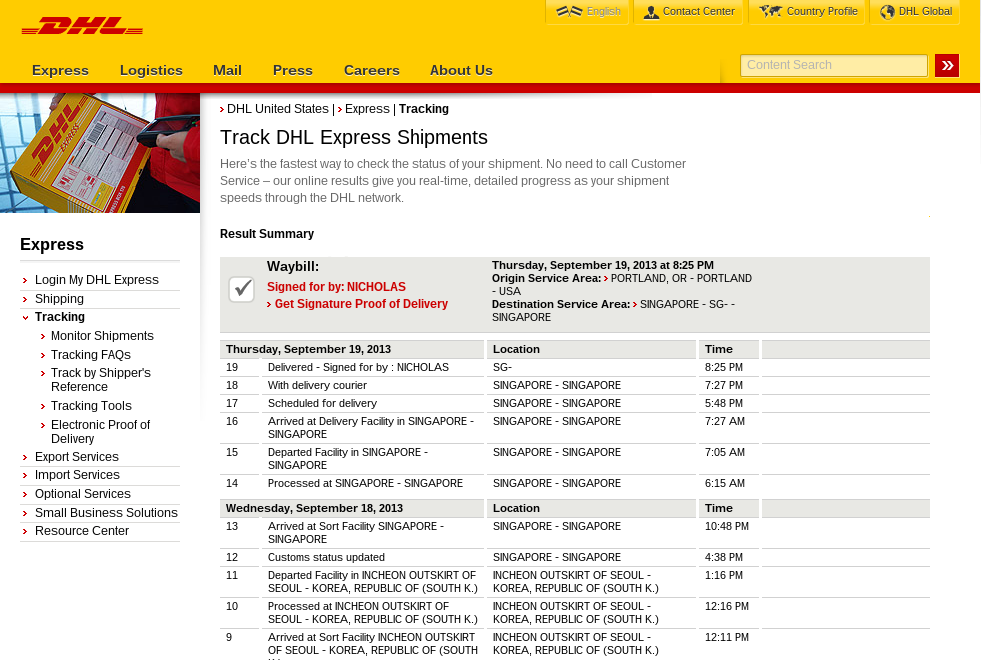
It’s not helpful, is it? You have a rough idea of where it is, but there is a lack of transparency. Before the service is purchased, you get a range of how many days it will take to deliver.
Shipping service providers roughly operate during office hours, so you will have to take time out of your schedule to arrange a pickup. The image below obtained from Parcel Monkey shows more information.

Image credit: https://www.parcelmonkey.com
Comparing The Cost Of Shipping A Hard Drive With Different Services
The second issue I’ll look at is cost. Understandably cost is unknown. It will depend on the number of hard drives you are sending, dimensions, weight, and delivery priority. If long-distance then shorter options of 1 or 2 days may not be an option. Speedier options can be relatively expensive.
For this example, I used Parcel Monkey, DHL, Fed Ex, UPS, and USPS (if applicable).
I didn’t take into account packaging, which would typically be a small box for the hard drive, placed in a larger box, with anti-vibration material such as loose-fill peanuts in between the two boxes.Thus, the dimensions used are not indicative of the larger box, nor is the weight the total weight of the hard drive and the boxes.
I declared my package to be a hard drive with the following dimensions: 3.5-inch hard drive:
- Length: 5.8 inches (14.732 cm), rounded up to 6 inches or 15 cm*
- Width: 4 inches (10.16 cm), rounded up to 11 cm*
- Height: 0.8 inches (2.032 cm), rounded up to 1 inch or 3 cm*
- Weight: 1.6 pounds (720 grams), rounded up to 2 pounds or 1 kg*
* Rounding up only occurred in some cases.
New York City is the destination location. Sender locations were as follows:
1. Los Angeles, US.
| Service Provider | Delivery Service | Estimated Time In Transit (Business Days) | Cost ($ US) |
|---|---|---|---|
| FedEx | First Overnight | 1 | 134.418 |
| FedEx | 2 Days | 2 | 49.30 |
| FedEx | Express Saver | 3 | 34.53 |
| Parcel Monkey | Express Saver Drop Off | 3 | 23.74 |
| Parcel Monkey | Express Saver Pickup | 3 | 29.60 |
| UPS | Next Day Air Saver | 1 | 40.05 |
| UPS | 2nd Day Air | 2 | 25.50 |
| UPS | 3 Day Select | 3 | 19.25 |
| USPS | Priority Express | 1-2 | 74.37 |
| USPS | Parcel Select | 2-8 | 26.45 |
I couldn’t use DHL’s shipping calculator in the above scenario, due to being told it was for frequent shipments only.
2. London, UK.
| Service Provider | Delivery Service | Estimated Time In Transit (Business Days) | Cost ($ US) |
|---|---|---|---|
| DHL | Express International | 1-6 | 98.74 |
| DHL | Express 12 | 1-6 | 176.98 |
| DHL | By 10:30 Express International | 1-6 | 187.74 |
| FedEx | International First | 1-2 Days | 170.27 |
| FedEx | International Priority | 1-2 | 121.10 |
| FedEx | International Economy | 5-7 | 113.07 |
| Parcel Monkey | International Pickup | 2-5 | 119.93 |
| Parcel Monkey | 3 International Priority | 1-2 | 121.16 |
| USP | Worldwide Express Plus | 1 | 249.76 |
| USP | Express Saver | 2-3 | 199.67 |
| USP | Worldwide Expedited | 6 | 180.38 |
3. Delhi, India.
| Service Provider | Delivery Service | Estimated Time In Transit (Business Days) | Cost ($ US) |
|---|---|---|---|
| DHL | Express International | 1-6 | 106.74 |
| DHL | Express 12 | 1-6 | 234.89 |
| FedEx | International First | 6 | 134.95 |
| FedEx | International Priority | 4 | 112.08 |
| FedEx | International Economy | 8 | 75.27 |
| Parcel Monkey | Express Saver | 2-6 | 99.08 |
| Parcel Monkey | International Priority | 1-2 | 92.42 |
| USP | 3 Worldwide Express Plus | 2 | 233.88 |
| USP | Express Saver | 2-3 | 179.67 |
| USP | Worldwide Expedited | 6 | 142.83 |
Advantages & Disadvantages Of Physical Shipping
| Advantages | Disadvantages |
Reliable: with millions of parcels shipped every day, it is safe to say for the most part they get the job done. Fast local shipping: shipping can be faster than digital services when sending a hard drive in a locally. Secure Packaging: some couriers will safely pack your hard drive for you, so at least you don’t have to do it yourself. Transfer huge amounts of data: you can get hard drives up to 20 TB, so you can send huge amounts of data. This could work out cheaper per GB transferred depending on the alternative solution under consideration. No need for an internet connection: an inability to get a stable internet connection, won’t hamper the delivery of your hard-drive. Personalized service: it’s reassuring to get a personal touch, and courier services do offer such a service. | Cost: when using high-priority (faster) delivery services, the price can be relatively expensive, certainly internationally. Lack of precise tracking: you’re in the dark as to the status of the delivery beyond generic terms like “with delivery courier”. Damaged during transit: in 2018, 11% of shipments were damaged or misplaced. Customs delay: if international delivery, then clearance through customs can cause a delay. Lost: although rare, due to the very nature of something leaving your possession, it does introduce another link in the chain. Seasonal fluctuation: peak season can slow down transit times. Charging for pick-up: not all couriers offer free package pickup. Charging extra for weekend delivery: couriers such as UPS do not offer free delivery on Saturday. Security risk: handing over the drive to someone else can increase the risk of data going into the wrong hands. Problematic Scalability: you can send a hard drive every day, but scaling your time and money can be a challenge. Hard-drive cost: unless you plan to get it sent back, you will have to factor in the cost of the hard-drive. |
Factors That Influence Your Online Transfer Rate
Because the next 3 options are to do with online transfer, I’ll briefly cover some factors that influence the speed you can get.
- Your internet connection speed, or to be more exact, your upload speed, is typically a lot slower than your download speed. No matter what solution you use, if you have a slow internet connection, you will need to get a faster one. No solution will give you more than what your connection allows.
- Traffic conditions, and how many others are sharing the internet connection. The route taken by the packets of data will also affect the speed of transmission.
- Server: the location and speed of the server you are uploading a file to, will influence the speeds you get. The greater the distance between your device and the server, the greater the latency, the longer it will take.
- Transfer Protocol: A major bottleneck when it comes to long-distance file transferring is the TCP protocol which won’t utilize all of your bandwidth. Furthermore, it is a protocol that has numerous handshakes and checks built-in that slows transfer rate.
You can use https://www.speedtest.net/ to check out your transfer rate.
Option 2: FTP
FTP stands for File Transfer Protocol. It’s a stalwart when it comes to transferring files. Typically, you will need to use a software client to upload a file such as Filezilla. FTP uses (TCP Transmission Control Protocol) to transfer files, which is slow in comparison to other transfer protocols. FTP was first specified in 1985, and understandably it is considered a legacy file transfer protocol.
Not only is it slow to upload or download, but you can get timeouts due to network conditions and latency. When you lose connection, you have to start again no matter how much of the file was uploaded. Arrgghh! Talk about wasting time.
FTP is from an age when files were much smaller. Its unsuitability for large file transfers in the face of sending large videos is quite apparent. Setting up ports, connecting to the right server, and using credentials can be tricky for the less than tech-savvy. Furthermore, it looks like it's from another era. Just a simple file and folder structure, and a status report window filled with technical jargon. You can forget about trying to create a professionally branded front-end, that aids pick and play usage.
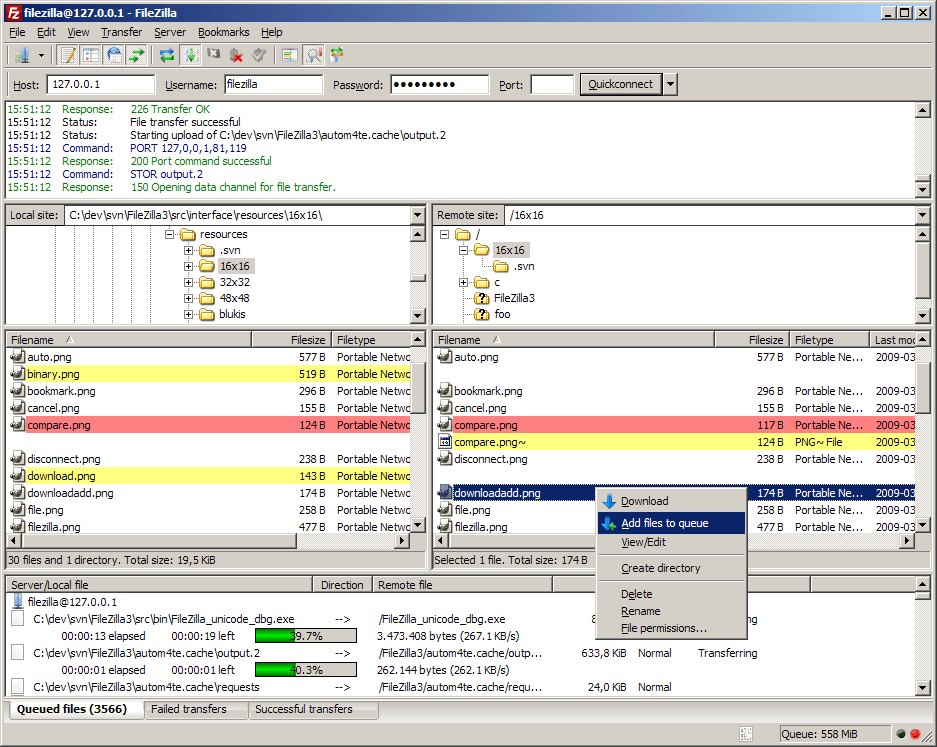
Image credit: https://filezilla-project.org/client_screenshots.php
Another sticking point when it comes to FTP-based solutions is the need to have hosted storage space. This can either be on a server, a web hosting provider, or a cloud-storage service, but without this, you have nowhere to upload the files to.
Finally, FTP lacks security, as there is no encryption involved. Hackers can intercept the information you send, such as data, username and password. Because of this lack of security, most big company (and a lot of medium-sized ones) firewalls prohibit FTP connection and access. For companies that must adhere to compliance requirements, FTP is not an option.
There is an encrypted secure version of FTP (SFTP), but it is a command-line interface when requires greater technical know-how.
Advantages & Disadvantages Of FTP
| Advantages | Disadvantages |
|---|---|
Cheap: you pay for your web space or server. If you are uploading to your clients webspace, you won’t need to pay for that. Standardized: as FTP has been around for a while, it has a standardized approach and methodology. No File Size Limit: when using an FTP client there is no file size limit. Multi-tasking: you can bulk upload and download multiple files at the same time. | Cheap: you pay for your web space or server. If you are uploading to your clients webspace, you won’t need to pay for that. Standardized: as FTP has been around for a while, it has a standardized approach and methodology. No File Size Limit: when using an FTP client there is no file size limit. Multi-tasking: you can bulk upload and download multiple files at the same time. Slow transfer speeds: FTP works on TCP, it is slow, and prone to losing connection. No storage space: you, your partners, or clients, will need to have online storage space, be it web space or a hosting server. Lack of visual customization: you can’t customize the user interface, attach background and logo images, so you can't promote your brand, nor have it as an extension of your brand. Lack of security: no encryption of data, nor of credentials means your data can be obtained by others. Blocked by firewalls: company firewalls will often block FTP connections due to the inherent security risks. Can’t resume transfers: if you lose connection, you will have to start from scratch, you can’t continue uploading/downloading where you left off. Technical-acumen: FTP can be a daunting and intimidating prospect to connect to servers and rummage around online files and folders. Installation required: to use an FTP client, you have to install the software, which may not be possible in restrictive environments. |
Option 3: Cloud File-Sharing Services
There are many online large file transfer tools, such as WeTransfer, Google Drive, Dropbox, and Filemail to name but a few file sharing services. These solutions are affordable, offer generous storage space, and make transferring large files easy.
You can upload a file, password protect the file, and share the link privately via email, or another medium of your choosing. Some solutions will monitor access and download activity, so you'll be notified if and when your file is downloaded.
Most of the solutions mentioned offer the ability for you to customize your space, which will be a subdomain URL. You can change the subdomain URL name, upload your logo, background images, and colors so you can present a user-friendly and brand-consistent front.
Pricing is a subscription per month or annually, in line with the current trend of software as a service. The actual cost of the services is affordable.
File size and speed are the two main issues when it comes to cloud-based solutions. If you want to send a large file, but you don't want to use a compressor or split your files, then you'll find that most of the solutions are not applicable. They just can't handle huge file sizes, and if they can, it will be a long transfer process.
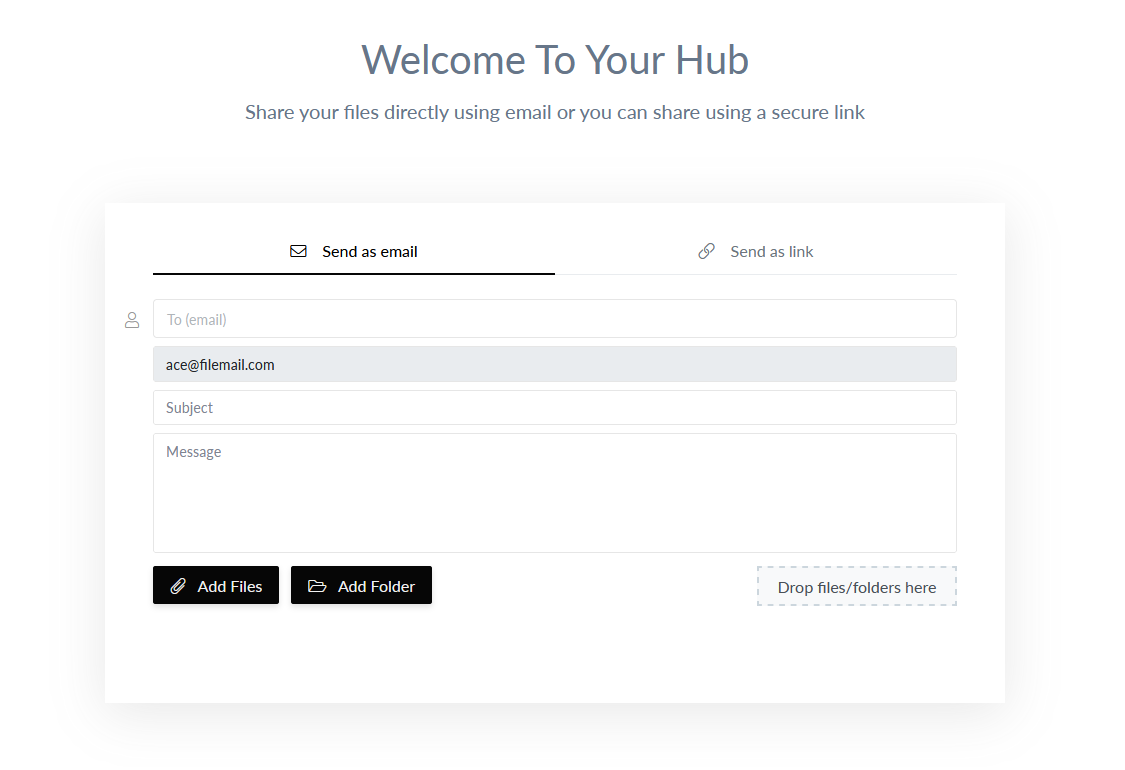
Filemail Cloud-Based File Sharing
Advantages & Disadvantages Of Cloud Services
| Advantages | Disadvantages |
|---|---|
Affordable: Prices charged by players in this space are low, 10 to 20 dollars a month. Accessibility: You can access the files from anywhere that you have an internet connection. Backup: Files in the cloud can be a backup just in case something untoward happens to the physical drives. Some providers offer data replication, where they copy your files to other servers, thereby reducing data redundancy. Updating and syncing: teammates can collaborate and have any changes synced for everyone else who is working with the video files. Regulatory Compliance: Some governments state that data must be stored in the region from where it originated. Providers who have globally distributed servers can help you stay on the right side of the law. Access-control: You can control who has access to the files you share, and you can use password protection to further control access. Security: end-to-end encryption of file transfers promotes data protection and prevents unauthorized access. Some providers like Filemail scan uploaded files for viruses. Real-time updates: Some providers will notify you when someone downloads or accesses your files. Limited file size: Providers will have limits on how big a file you can send. If they offer a more expensive package, then in some cases, the max file size is higher. Relatively slow transfer rates: TCP-based transfer can be slow. The further you are from the server you are uploading to, the more the latency will increase, further slowing delivery. To negate this, some providers have servers distributed globally. Internet connection needed: With cloud-based solutions, you need an internet connection, but what happens when you can’t get an internet connection? What happens if you are on a slow network, or if you keep losing connection? You can’t send a thing. Privacy: Your data is not in your hands. Who has access to it? How secure is it? Dropbox famously had a few issues when it came to security breaches, although to be fair, that was a few years ago. More worryingly Dropbox reserves the right to access your data to this day. Governmental intrusion: some governments have passed various laws that permit them or national agencies to demand access to your data. This means file-sharing platforms in some countries have no choice, they must comply with the request and share your data. | Limited file size: Providers will have limits on how big a file you can send. If they offer a more expensive package, then in some cases, the max file size is higher. Relatively slow transfer rates: TCP-based transfer can be slow. The further you are from the server you are uploading to, the more the latency will increase, further slowing delivery. To negate this, some providers have servers distributed globally. Even then, transferring large files can take time. Internet connection needed: With cloud-based solutions, you need an internet connection, but what happens when you can’t get an internet connection? What happens if you are on a slow network, or if you keep losing connection? You can’t send a thing. Privacy: Your data is not in your hands. Who has access to it? How secure is it? Dropbox famously had a few issues when it came to security breaches, although to be fair, that was a few years ago. More worryingly Dropbox reserves the right to access your data to this day. Governmental intrusion: some governments have passed various laws that permit them or national agencies to demand access to your data. This means file-sharing platforms in some countries have no choice, they must comply with the request and share your data. |
Comparing Cloud Sharing Services
| Filemail Pro | FTP | Dropbox Individual Plus | Google Drive Free | Microsoft One Drive | WeTransfer Pro | |
| Max File Size | 250 GB | Unlimited | 2 GB | 5 TB | 15 GB | 20 GB |
| Transfer Protocol | TCP | TCP | TCP | TCP | TCP | TCP |
| Storage Capacity | 1 TB | - | 2 TB | 15 GB | 5 GB | 1 TB |
| Cost Per Month | $10 | Free | $9.99 | Free | Free | $12 |
| Additional Notes | Additional storage can be purchased. | Server space is an additional cost. | Dropbox offers tiers which have a larger maximum file size. | Upgrade to a paid plan to send more than your storage space allowance. | Upgrade to a paid plan to send a 15 GB file. | WeTransfer have no additional plans, 20 GB is the maximum you can send with them. |
For a more detailed look, check out our file-sharing services comparison.
If you need to send files larger than 250 GB, get a Filemail Business account. You can send files of any size, and their Business account uses UDP, an accelerated cloud solution. Accelerated cloud? What's that? I'm glad you asked.
Option 4: Accelerated Cloud File-Sharing Solutions
Accelerated Cloud is a broad term used to describe a variety of accelerated solutions that provide faster transfer speeds than TCP-based solutions. The technology behind the acceleration is either UDP-based or high-end servers as part of an accelerated network.
UDP stands for User Datagram Protocol. It is a transport layer protocol, an alternative to TCP, that works on top of the Internet Protocol (IP). It’s just as old as FTP but wasn’t used much. Out of the two, TCP and UDP, UDP is much faster, and currently, the fastest way to transfer files online. UDP is fast because it uses as much available bandwidth as possible, and doesn't engage in repetitive gentlemanly handshakes.
When using a browser to transfer files, the browser will use TCP. To use UDP you will need to install some software. Software provided by Aspera, Signiant, and Globalscape will need configuring, and users may need training. Not exactly something you can test-drive by jumping into it.
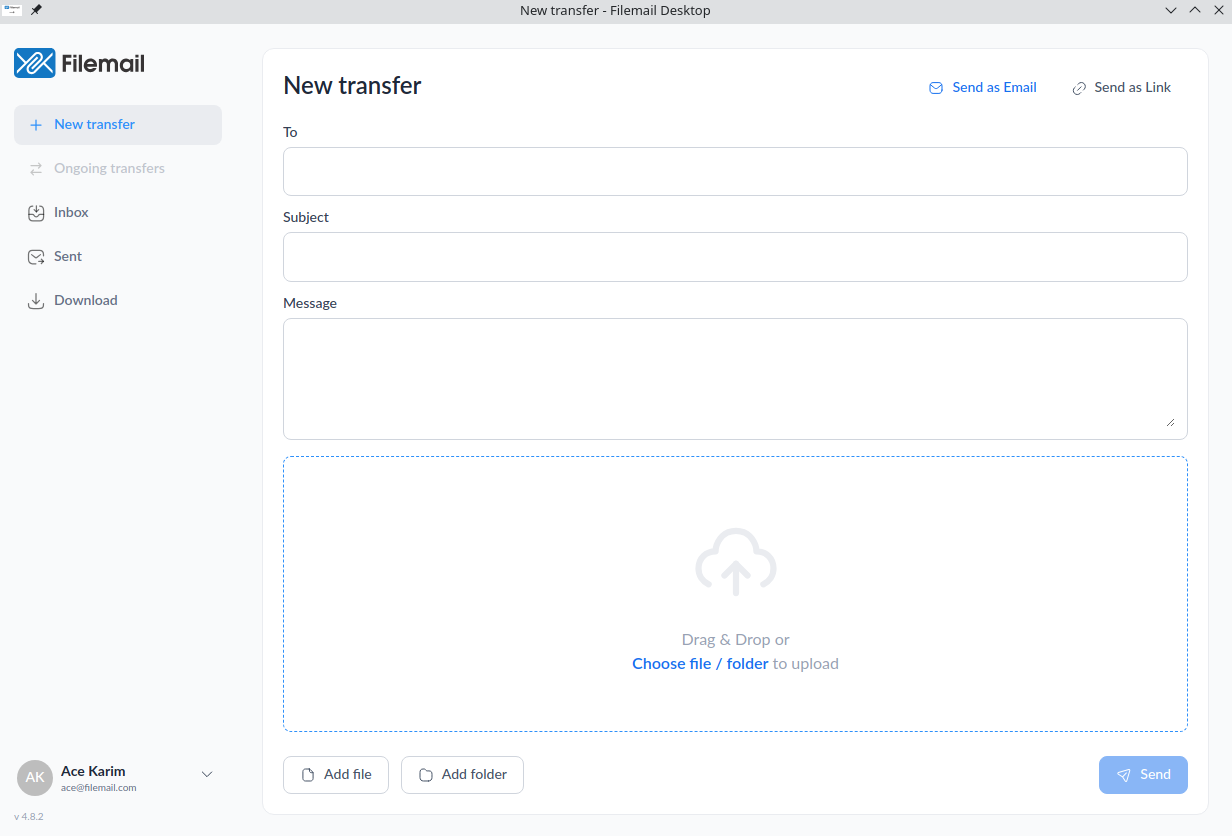
Filemail offers UDP transfer acceleration via their desktop apps for Windows and Mac. Thankfully, there is no configuration involved - you install the app, log in and you are ready to start sending long video files. As well as enhanced speeds by using UDP, you’ll also get auditable trails and compliance with a range of regional and global mandates.
When it comes to high-end servers, there are offerings such as Masv, but transfer speeds are not as fast as UDP. They also charge per GB downloaded and charge for storage per GB beyond 10 days of free storage.
Because the majority of solutions in this category are enterprise-level, they have prices to match, although there is a large discrepancy between them.
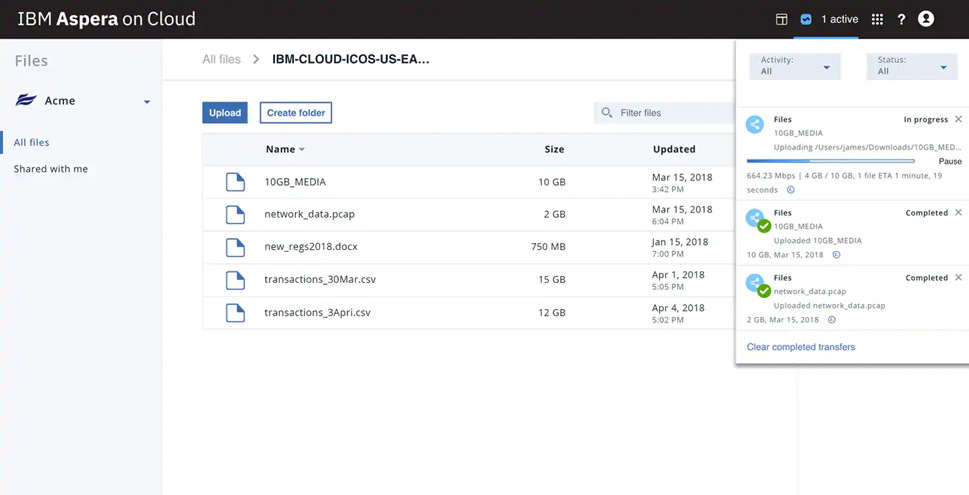
Image credit: https://www.pro-tools-expert.com
Advantages & Disadvantages Of Accelerated Cloud Solutions
| Advantages | Disadvantages |
Speed: Quite simply, by far the fastest speeds. Reliable: UDP based solutions have built in error-checking, will automatically send failed or corrupted packets, and can resume file transfers. Increased uptime: Accelerated cloud providers target businesses and enterprises. They reserve use of their most robust fastest servers for clients who procure their most expensive package. Prioritized support: A human helping hand isn’t far away, you may have dedicated account managers, or a higher priority with customer support staff. Cost: Solutions are more expensive due to the increase in speed, storage space, and the file sizes they can handle. Budgeting: Aspera does offer a PAYG plan, and Masv only offers a PAYG service. This can make budgeting a challenge. Trying to forecast the requirements and deliverables for a future project, and the resultant cost to store and transfer can be difficult. A subscription model lets you know where you stand, month-in and month-out. Storage costs: Masv charges for storage beyond 10 days. Signiant doesn’t offer storage, so you will need to get storage from elsewhere. Installation & Configuration: Solutions like Aspera and Globalscape require installation, and a process of configuration and refinement to get the best out of the system. Training: Due to the complexity of some UDP-based solutions, users may need to be trained to use them. This slows adoption and delays real-world usage. Data Quotas: some UDP solutions have set limits on data transfers, and if you go above that, you’ll have to pay a surcharge. Filemail has no data quotas. Masv doesn’t have a data quota as it charges per GB downloaded. | Cost: Solutions are more expensive due to the increase in speed, storage space, and the file sizes they can handle. Budgeting: Aspera does offer a PAYG plan, and Masv only offers a PAYG service. This can make budgeting a challenge. Trying to forecast the requirements and deliverables for a future project, and the resultant cost to store and transfer can be difficult. A subscription model lets you know where you stand, month-in and month-out. Storage costs: Masv charges for storage beyond 10 days. Signiant doesn’t offer storage, so you will need to get storage from elsewhere. Installation & Configuration: Solutions like Aspera and Globalscape require installation, and a process of configuration and refinement to get the best out of the system. Training: Due to the complexity of some UDP-based solutions, users may need to be trained to use them. This slows adoption and delays real-world usage. Data Quotas: some UDP solutions have set limits on data transfers, and if you go above that, you’ll have to pay a surcharge. Filemail has no data quotas. Masv doesn’t have a data quota as it charges per GB downloaded. |
The Difference Between Filemail & Other UDP Providers
Some of the disadvantages mentioned above do not apply to Filemail:
Filemail doesn’t require any technical expertise to install. It’s as simple as installing any other desktop app.
No technical expertise is required to use the app, it’s as intuitive as email.
Filemail uses TCP port 443, like all common traffic, so there won’t be issues with firewalls and granting special access.
You can jump right into testing Filemail’s desktop UDP app due to the lack of technical configuration needed and ease-of-use.
UDP solutions are expensive. Filemail isn’t.
Comparing Accelerated Cloud Solutions To Send Large Video Files
Filemail Business, IBM Aspera, Dropbox Business Advanced, Google One, Signiant and Masv are compared in this section. The following criteria was used:
Maximum File Size: The service provider lets you send files greater than 250 GB.
Transfer Protocol: Can be TCP (slowest), UDP (Fastest).
In some cases, service providers offer a multitude of accounts, so an account type was selected where:
Price is shown, rather than ring or contact us for a quote
Offering the largest file size they can transfer
| Filemail Business | IBM Aspera | Dropbox Business Advanced | Google One | Signiant | Masv | |
| Max File Size | Unlimited | Unlimited | 100 GB | 5 TB | Unlimited | Unlimited |
| Transfer Protocol | UDP | UDP | TCP | TCP | UDP | TCP* |
| Storage Capacity | 1 TB per user | 10 TB | 5 TB | 2 TB | - | Unlimited |
| Cost ($ US) | $15 / User / month | PAYG: $0.95 per GB transferred Subscription: $10,440 | $20 / User / month | $9.99 / month | Starting at $7,500 | Free for 10 days, then $0.10 GB / month $0.25 per GB downloaded |
| Additional Notes | Additional storage can be purchased. | Subscription: Minimum 6 TB of transfer volume per year | Minimum 3 users. Additional storage space can be purchased. | You will have to upgrade to a paid plan to send more than your storage space allowance. | You will have to get storage space, which will be an additional cost. | Masv operates a pay as you go model, which can soon add up. |
*Although Masv uses TCP, they use high-end servers to give you good transfer rates, but is not as fast as UDP-based tools.
A more detailed comparison between enterprise-grade service providers is available in our managed file transfer software comparison.
Comparing Accelerated Cloud Solutions & Physical Shipping
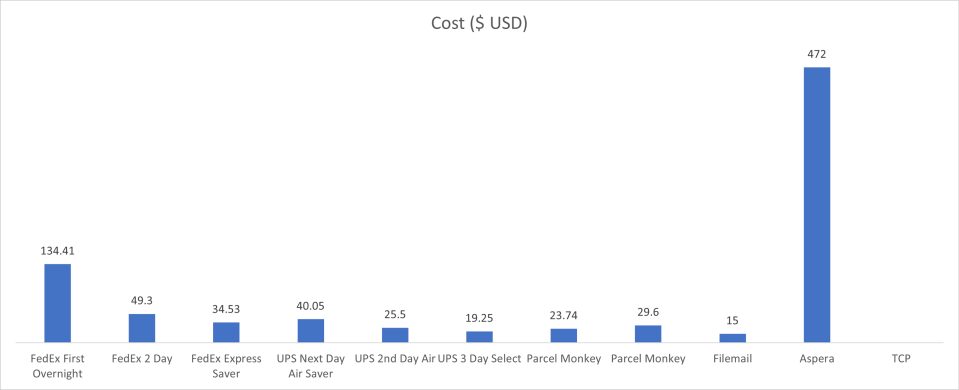
Let’s go full circle, and compare the accelerated cloud solutions with physical shipping. The comparison is in terms of time taken to transfer/deliver and cost. TCP-based providers were removed due to their lack of speed. Signiant was removed due to their starting price of $7’500 completely throwing the Cost Chart out of wack.
Filemail, Aspera, and Signiant offer UDP and TCP file transfer time calculators. I used their results for UDP, but combined their TCP results to get an average time taken. The following values were used in this example:
• Amount to transfer: 500 GB, so 1 hard drive
• Upload transfer rate: 100 Mbps
• Destination location: New York City
• Sender location: Los Angeles
Note: I removed shipping services that gave a range of days. I didn’t take into account the cost of TCP-based solutions, because this is about the fastest speeds. I used Aspera’s PAYG model: $0.95 per GB transferred.

Customers Ask, We Answer
The providers mentioned in this guide will let you send any type of video file.
You can’t. Email file attachment sizes are limited. The limit depends on the email provider, from 10 MB to 25 MB. Use one of the above solutions to negate the attachment limitation. Some solution providers offer native plugins for email clients, such as Filemail which has a plugin for Outlook so you can send a large video file within Outlook.
There are numerous apps that you can use to send long video files. Alternatively, you can upload your files to Google Drive. A word of warning though, Google Drive only gives you 15 GB of storage which is shared across Google Drive and Gmail. You can upgrade to Google One to get 100 GB, 200 GB, or 1 TB for a fixed price a month.
You can use a file transfer app, which as you can imagine there is a vast number available in Google Play Store. Filemail offers an app for Android, which is very simple to use. Choose the files you want to send, add the recipient's email address, and you are good to go. With a business account, you can send a video file of any size. However, if you want to blistering fast UDP transfer rates, you’ll need to use the desktop apps.
AirDrop is a popular service to send large videos from iPhone. But, AirDrop has restrictions that are insurmountable for video professionals. The maximum distance between the sender and receiver is 10 meters because it uses Bluetooth and Wi-Fi to transfer files.
You can overcome this restriction by using a file-sharing app. Just like with Android, many apps are available, that can be used to send large files. Filemail offers an app for iPhone (and iPad). The process is the same as it is for Android. Select the file or files that you want to share. Submit the recipient's email address so that they are emailed a link, or you can share the link with them through other means. Hit send. The files are uploaded to your Filemail account, ready for download by the recipient.
Yes, no problem. After you have uploaded a video to Filemail you will get a link. You can share this link in your SMS message. The receiver can click on the link, and go to the file for download.
Chat apps have video file size restrictions. Facebook Messenger has a paltry 20 MB, and WhatsApp a meager 100 MB maximum video file size. Not much use. Get around this restriction by sharing your videos via a cloud-based file-sharing solution.
Acknowledgment
I’d like to thank the many videographers and video specialists who aided me in the production of this guide.
Disclaimer
The information in this guide is meant to be for reference only. It is at best indicative under certain conditions and can not be accurate in real-world usage. Shipping prices are accurate on the 17th of April 2021.
References
Canon R5: https://cam.start.canon/hy/C003/manual/html/UG-09_Reference_0100.html#Reference_0100_3
Canon 5D Mark IV: https://www.usa.canon.com/internet/portal/us/home/products/details/cameras/eos-dslr-and-mirrorless-cameras/dslr/eos-5d-mark-iv
Canon 5D Mark III: https://www.usa.canon.com/internet/portal/us/home/products/details/cameras/eos-dslr-and-mirrorless-cameras/dslr/eos-5d-mark-iii
Canon 5D Mark II: https://www.usa.canon.com/internet/portal/us/home/products/details/cameras/support-dslr/eos-5d-mark-ii/
RED Cameras: https://www.red.com/recording-time
Arri Alexa LF: https://www.arri.com/en/learn-help/learn-help-camera-system/tools/formats-and-data-rate-calculator https://ymcinema.com/2019/03/29/digital-cinema-cameras-data-consumption-chart/
Apple iPhone 12 Pro: https://www.apple.com/iphone-12-pro/specs/
https://apple.stackexchange.com/questions/409853/how-much-video-can-you-record-on-a-64-gb-iphone-12
Samsung Galaxy S20+: https://www.samsung.com/us/mobile/galaxy-s20-5g/specs/
GoPro Hero 8: https://www.dcrainmaker.com/2019/10/gopro-hero8-black-review.html
Sony a7s Mark III: https://www.sony.com/electronics/interchangeable-lens-cameras/ilce-7sm3/specifications
Vimeo codec: https://vimeo.com/help/compression
YouTube codec: https://support.google.com/youtube/answer/4603579?hl=en
H264 used by broadcasters globally: https://en.wikipedia.org/wiki/List_of_video_services_using_H.264/MPEG-4_AVC#Terrestrial_broadcast_adoption
Video file size calculator: https://www.digitalrebellion.com/webapps/videocalc
In 2018, 11% of parcels damaged during physical shipping: https://www.parcelpending.com/blog/package-delivery-statistics/
FedEx Pricing Calculator: https://www.fedex.com/en-us/online/rating.html
DHL Price Calculator: https://www.dhl.com/us-en/home/get-a-quote/one-time-shipment-quote.html
UPS Price Calculator: https://wwwapps.ups.com/ctc/request?loc=en_US
Parcel Monkey Shipping Calculator: https://www.parcelmonkey.com/
Signiant File Transfer Calculator: https://www.signiant.com/file-transfer-calculator/
IBM Aspera File Transfer Calculator https://www.ibm.com/aspera/file-transfer-calculator/
Filemail File Transfer Time Calculator: https://www.filemail.com/file-transfer-time-calculator