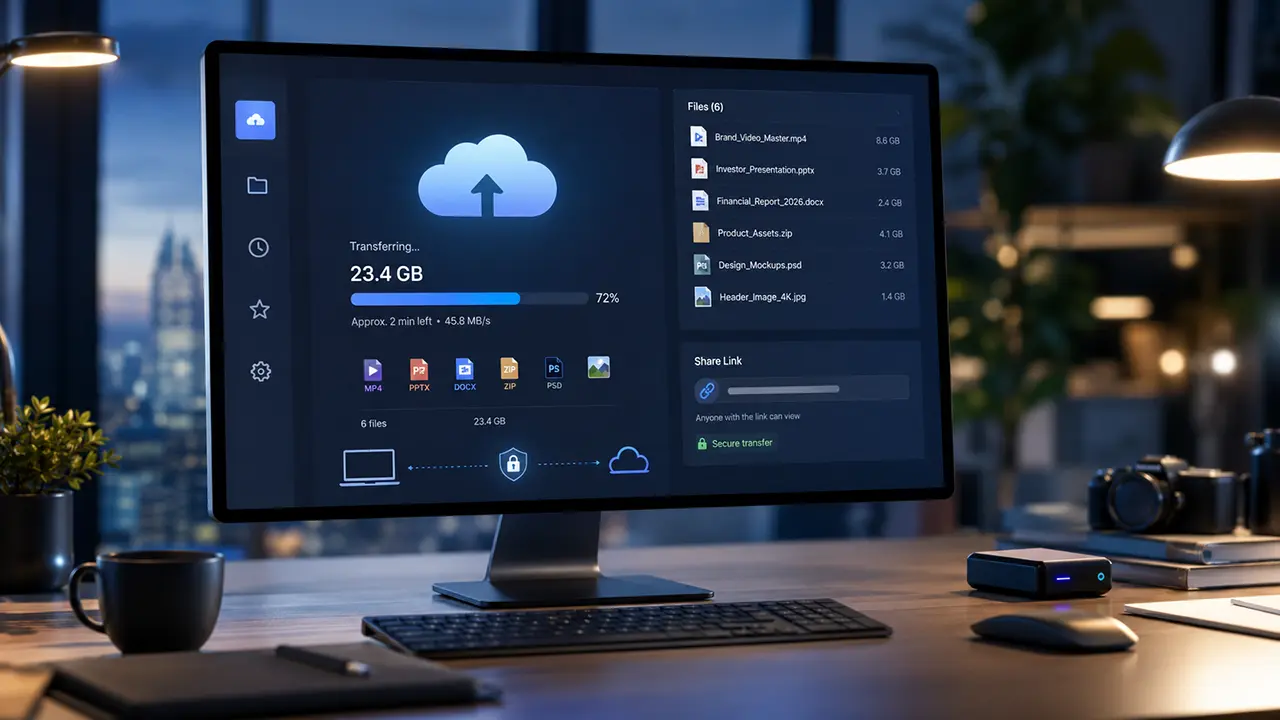
How to Share Large Folders and Project Folders Online

Knowing how to share large folders online is essential when your work depends on more than one file.
Project folders often include videos, images, documents, design files, source files, spreadsheets, PDFs, audio files, and subfolders. Sending these items one by one wastes time and creates confusion for the recipient.
A better approach is to use a method that keeps the folder structure intact, supports large file sizes, and makes delivery simple. For many teams, file sharing is not just about moving one file. It is about sending a complete project folder without breaking the workflow.
Why Sharing Large Folders Is Different From Sending Files
Sending one file is simple. Sharing a large folder is more complicated.
A folder may include hundreds or thousands of files. Some files may be small documents. Others may be large videos, raw images, CAD files, project exports, or compressed archives.
The problem grows when the folder has a structure that matters. A designer may organize assets by client, version, and export format. A video editor may separate raw footage, audio, project files, thumbnails, and final exports. A business team may organize contracts, invoices, briefs, and reports by department.
If the folder structure changes during delivery, the recipient may not know where files belong. They may miss important files or spend time rebuilding the project.
This is why the best way to share project folders online depends on three things:
- Folder size
- Folder structure
- How the recipient needs to access the files
Common Problems When Sharing Large Project Folders
Large folders create problems that normal attachments cannot handle.
Email Attachment Limits
Email is not built for large folder transfer.
Most email platforms limit attachment size. Even when a folder is compressed into a ZIP file, the final file may still be too large. Email also does not handle folder structures well unless the folder is zipped first.
This creates a simple problem. You may have a complete project folder ready to send, but email cannot deliver it.
Broken Folder Structure
Project folders often rely on structure.
If files are sent separately, the recipient may receive them out of order. If files are split across multiple messages, links, or uploads, it becomes easier to lose context.
This matters for creative work, legal documents, financial records, software projects, and client deliverables.
Compression Issues
Many people zip a folder before sending it.
This can work for smaller folders. But compression can become slow when the folder is very large. It can also create another problem if the recipient has trouble extracting the ZIP file.
Some folders may contain file types that do not compress much. Videos, images, and already-compressed files often remain large even after zipping.
Cloud Storage Permissions
Cloud storage tools can share folders, but they often add permission steps.
You may need to upload the folder, create a shared folder, adjust access settings, invite the recipient, and manage who can view or edit the files.
This works well for collaboration. It can feel heavy when the goal is simply to deliver a folder and move on.
Slow Uploads and Failed Transfers
Large folders take longer to upload.
If the connection drops, some platforms may require you to start again. This is frustrating when the folder contains many files or the upload is time-sensitive.
For client work, failed delivery can delay approvals, production, or payment.

Best Methods to Share Large Folders Online
There are several ways to send large folders online. The right method depends on the size of the folder, the workflow, and the recipient’s needs.
Method 1: Compress the Folder Into a ZIP File
Zipping a folder is one of the most common ways to share a project folder.
It combines the folder into a single file. This makes it easier to upload, transfer, and download. It also helps preserve the folder structure.
Best For
- Small project folders
- Documents and images
- One-time delivery
- Folders that fit within platform limits
Limitations
ZIP files can still be too large for email. They can also take time to create and extract.
If the folder contains large videos, raw media, or design files, compression may not reduce the size much. The recipient also needs enough storage space to download and extract the folder.
When To Use It
Use ZIP files when the folder is not too large and the recipient only needs one download.
Avoid this method when the folder is extremely large, changes often, or needs secure access control.
Method 2: Use Cloud Storage
Cloud storage platforms let you upload folders and share access with other people.
This is useful when the folder needs to stay available after sharing. It also works well when several people need to edit or access the same files over time.
Best For
- Team collaboration
- Shared folders
- Ongoing access
- Document editing
- Internal projects
Limitations
Cloud storage is not always the simplest option for delivery.
The sender must manage storage, permissions, folder access, and sometimes account requirements. If the recipient only needs to download the folder once, this can add unnecessary steps.
Cloud storage can also become messy when large folders are shared with many external clients.
When To Use It
Use cloud storage when people need ongoing access to the folder.
Do not use it only because a folder is large. If the goal is delivery, a dedicated transfer method may be easier.
Method 3: Use a Large File Transfer Service
A large file transfer service is often the simplest way to send project folders online.
Instead of creating a shared workspace, you upload the folder and send it by email or shareable link. The recipient downloads the folder without needing to manage a shared storage space.
This is useful when you need large file transfer for client delivery, creative projects, video files, or business folders.
Best For
- Large project folders
- Client delivery
- External file sharing
- Video production folders
- Design assets
- Large document collections
- One-time or repeated transfers
Limitations
A transfer service is built for delivery, not live collaboration.
If several people need to edit files inside the same folder every day, cloud storage may be better. If the goal is to send the folder and confirm access, a transfer service is usually more direct.
When To Use It
Use a transfer service when folder delivery matters more than ongoing collaboration.
This is often the best method when sending large folders to clients, vendors, agencies, partners, or external teams.
Method 4: Use a File Request
Sometimes the problem is not sending folders. The problem is receiving folders from someone else.
A file request lets clients, partners, or colleagues upload folders to you without creating a complicated shared folder setup.
This is helpful when you need to collect project folders from many people. You can use receive large files workflows for client uploads, project submissions, or external file collection.
Best For
- Receiving folders from clients
- Collecting project assets
- Vendor submissions
- Client onboarding
- Agency workflows
Limitations
A file request is mainly for receiving files.
If you need to send a completed folder back to the recipient, you still need a delivery method such as email link sharing or a file transfer service.
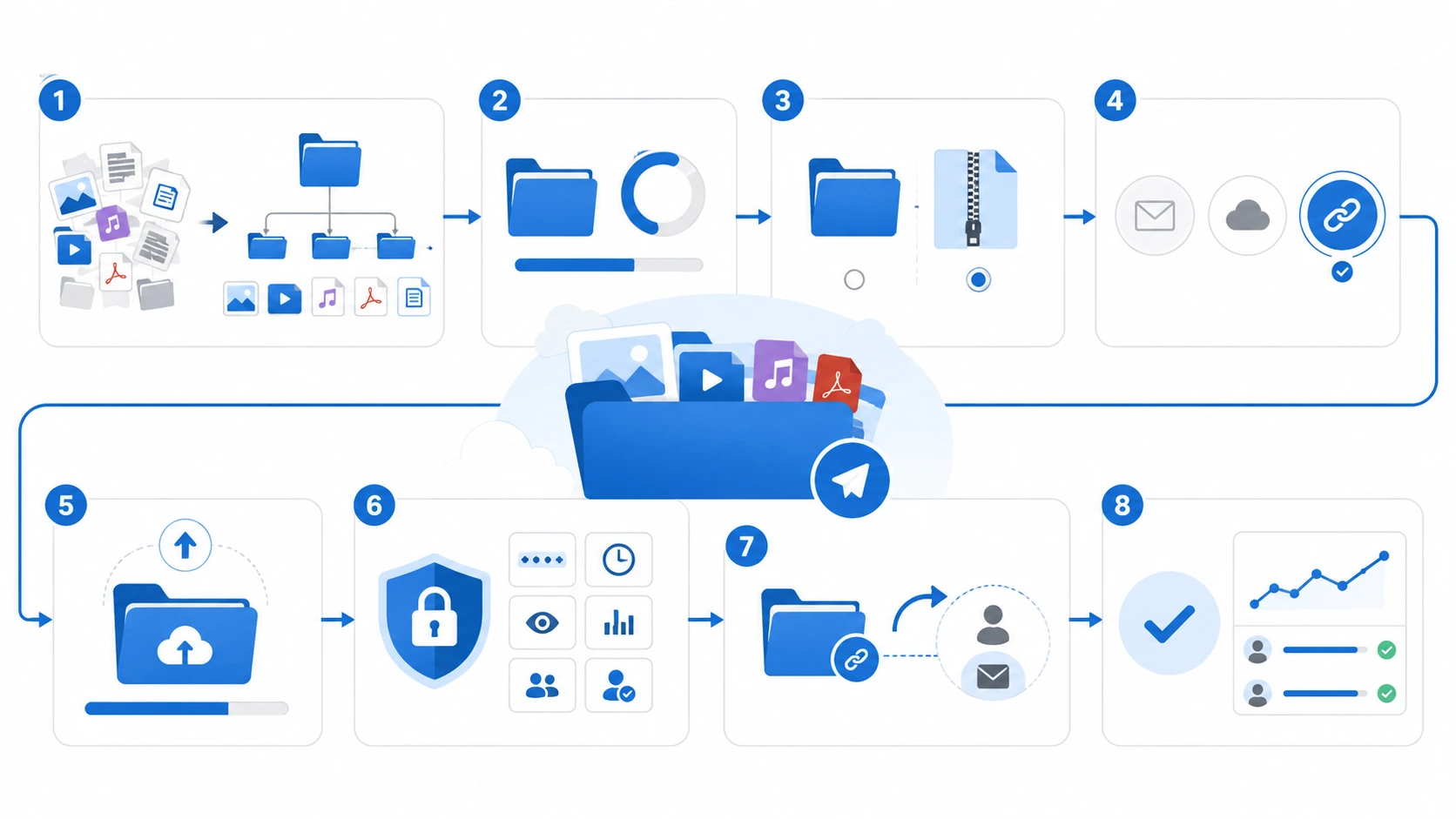
How to Share Large Folders Online Step by Step
The best workflow is simple. Prepare the folder, choose the right method, upload it, set access controls, and send it to the recipient.
Step 1: Organize the Folder First
Before uploading, clean up the folder.
Remove duplicate files, old drafts, temporary exports, and unused assets. Keep only the files the recipient needs.
Use clear folder names. For example:
- ClientName_ProjectName_Final
- Video_Project_Raw_Footage
- Brand_Assets_2026
- Legal_Documents_ClientName
- Website_Redesign_Project_Folder
A clean folder reduces confusion and makes the transfer easier to manage.
Step 2: Check the Folder Size
Check the total folder size before choosing a method.
A 500 MB folder may work with several tools. A 20 GB folder needs a more reliable option. A 100 GB project folder needs a method built for very large transfers.
This step helps you avoid failed uploads and wasted time.
Step 3: Decide Whether To Zip the Folder
Zipping is optional.
Use a ZIP file when the folder is small enough and you want one downloadable file. Avoid zipping when the folder is very large, contains many media files, or needs to remain easy to browse.
If the recipient is not technical, a direct folder transfer may be easier than sending a compressed archive.
Step 4: Choose the Delivery Method
Choose the method based on the goal.
Use email only for small files. Use cloud storage when people need ongoing access. Use a transfer service when you need to send a large folder quickly.
For professional delivery, a shareable link is often the easiest option. It lets you send the folder without forcing the recipient into a shared workspace.
Step 5: Upload the Folder
Upload the full folder using the platform you choose.
If the service supports folder upload, use that instead of selecting files one by one. This helps preserve the folder structure and reduces mistakes.
With Filemail, you can upload files or folders and send them by email or link.
Step 6: Add Security Controls
Large project folders often contain sensitive files.
Before sending, consider whether the transfer needs:
- Password protection
- Expiration date
- Download notifications
- Recipient restrictions
- Transfer tracking
- Encryption
- Access logs
For business folders, password protection can help reduce the risk of unwanted access.
Step 7: Send the Link or Email
After the folder is uploaded, send it to the recipient.
Use a short message that explains what the folder contains. Mention any password, expiration date, or download instructions.
If the folder is large, tell the recipient to download it on a stable connection.
Step 8: Track Delivery
Sending the folder is only part of the process.
For client work, you may need to know whether the recipient accessed the files. File tracking helps when delivery confirmation matters.
This is useful for approvals, deadlines, and business workflows where missed downloads can delay the project.

Use Cases for Sharing Large Project Folders
Large folder sharing is useful across many industries and workflows.
Creative Agencies
Agencies often send complete project folders to clients.
These folders may include brand assets, campaign files, design exports, videos, photos, and final deliverables. Sending each file separately creates confusion.
A single folder transfer keeps everything organized.
Video Production Teams
Video projects can create massive folders.
Raw footage, audio files, project files, color exports, thumbnails, and final videos can quickly reach tens or hundreds of gigabytes. For these workflows, large video files need a reliable transfer method.
A dedicated transfer service can make delivery easier than splitting files across several links.

Photographers
Photographers often send full galleries or edited image folders.
A folder may include high-resolution images, contact sheets, RAW files, and final exports. Cloud galleries can work for viewing, but full folder delivery is often better for clients who need the original files.
Architects and Engineers
Architecture and engineering teams often share folders with drawings, models, PDFs, CAD files, and project documentation.
These files must stay organized. A missing file can cause delays or confusion.
Sharing the full folder helps preserve context.
Legal and Financial Teams
Legal and financial folders may include contracts, statements, evidence files, reports, and sensitive records.
Security matters in these workflows. Access control, password protection, and tracking are more important than convenience alone.
Software and Development Teams
Development folders can include builds, logs, assets, exports, and documentation.
For internal collaboration, repositories and cloud tools may be best. For external delivery, a folder transfer can be simpler.
Pros and Cons of Each Method
ZIP Files
Pros | Cons |
| Easy to create | Can still be too large |
| Keeps files in one package | Can take time to compress |
| Preserves folder structure | Recipient must extract files |
| Works with many platforms | Not ideal for very large folders |
Cloud Storage
Pros | Cons |
| Good for collaboration | Requires permission management |
| Supports ongoing access | Can create storage clutter |
| Useful for shared folders | Less direct for one-time delivery |
| Works well for document editing | May require recipient accounts |
File Transfer Services
Pros | Cons |
| Built for sending large folders | Not designed for live document editing |
| Simple recipient experience | Folder availability may depend on plan settings |
| Works well for external delivery | Very large transfers need a stable connection |
| Supports email and shareable links | |
| Can include security and tracking options |
File Requests
Pros | Cons |
| Easy way to receive folders | Mainly used for receiving |
| Useful for clients and external users | Not a full collaboration workspace |
| Reduces email back-and-forth | Requires clear upload instructions |
| Keeps incoming files organized |

What To Look For in a Large Folder Sharing Tool
Not every file sharing tool handles folders well.
Before choosing a platform, check these points.
Folder Upload Support
The tool should support full folder uploads.
If you must select every file manually, the process becomes slow and error-prone.
Large Transfer Limits
Project folders can grow quickly.
Look for a tool that supports the folder sizes you actually send. If your folder is 20 GB, a 2 GB limit does not help.
Shareable Links
A shareable link makes external delivery easier.
The recipient can download the folder without joining a workspace or searching through a shared drive.
Security Options
Large folders often contain important files.
Look for password protection, encryption, expiration controls, and access management.
Download Tracking
Tracking helps you confirm that the recipient accessed the folder.
This matters when the folder contains client deliverables, legal documents, financial files, or production assets.
Recipient Experience
The recipient should not struggle to access the files.
A good transfer tool makes the download clear, fast, and simple.
Why Filemail Is Useful for Sharing Large Folders
Filemail is built for sending large files and folders without the friction of email attachments or complex shared storage.
You can select files or folders, upload them, and send them by email or shareable link. This makes it useful when you need to deliver complete project folders to clients, partners, or external teams.
Filemail is especially useful when the folder is too large for email or when cloud storage creates too many permission steps.
It can help with:
- Large folder transfer
- Project folder delivery
- Client file sharing
- Large video folder delivery
- Business document folders
- Secure folder sharing
- External file delivery
Filemail also supports workflows where delivery matters. Password protection, tracking, email notifications, and paid-plan options for larger transfers can help teams manage project delivery more confidently.
Best Way To Share Large Folders With Clients
The best method depends on what the client needs.
If the client needs ongoing access, cloud storage may work. If the client only needs to download the completed folder, a transfer service is usually cleaner.
For client delivery, the main goal is not collaboration. The main goal is successful delivery.
A good client workflow should:
- Keep files organized
- Avoid email attachment limits
- Make downloads simple
- Protect sensitive files
- Confirm delivery when needed
This is why many project teams prefer sending a transfer link instead of creating a shared folder for every client.
Best Way To Share Project Folders Without Zipping
You do not always need to zip a project folder.
If the transfer service supports folder upload, you can upload the folder directly. This helps avoid compression time and extraction problems.
This is useful when the project folder contains large media files. Videos, images, and project exports may not compress much anyway.
Direct folder upload is often easier for the sender and the recipient.
Best Way To Share Very Large Project Folders
Very large folders need a method built for size and reliability.
If the folder is 10 GB, 50 GB, or 100 GB+, email will not work. Standard cloud sharing may work, but it can add permission and storage management steps.
For very large project folders, use a large file transfer service that supports folder uploads, shareable links, and delivery tracking.
You should also use a stable internet connection and avoid renaming or moving files during upload.
FAQ
Can I send a large folder by email?
Usually, no.
Most email platforms have attachment limits. A folder also needs to be compressed before email can attach it. If the ZIP file is too large, the email will fail.
For large folders, use cloud storage or a file transfer service.
What is the best way to share a large project folder online?
The best way depends on the workflow.
Use cloud storage when people need ongoing access and collaboration. Use a file transfer service when you need to deliver the folder to a recipient quickly and cleanly.
Should I zip a folder before sending it?
You can zip a folder if it is small enough and you want one downloadable file.
For very large folders, zipping may take too long and may not reduce the size much. If the platform supports folder uploads, direct upload can be easier.
How do I share a folder without losing the folder structure?
Use a ZIP file or a service that supports folder uploads.
Avoid sending files one by one unless the folder structure does not matter.
How can I share a large folder with a client?
Organize the folder, check its size, upload it to a transfer service, add security controls if needed, and send the client a download link.
Use tracking if you need delivery confirmation.
Can I share large folders without the recipient creating an account?
Yes, some transfer services allow recipients to download files from a link without creating an account.
This is often easier for external clients and one-time deliveries.
Is cloud storage better than a file transfer service?
Cloud storage is better for collaboration and ongoing access.
A file transfer service is better when the goal is delivery. If the recipient only needs to download the folder, a transfer link is usually simpler.
How do I share a folder securely?
Use a trusted transfer platform with password protection, encryption, expiration controls, and tracking.
Do not send sensitive folders through open links without access controls.
Conclusion
Sharing large folders online is different from sending individual files.
Large folders often contain many files, subfolders, and project assets that need to stay organized. Email usually fails because of attachment limits. Cloud storage can work, but it may add unnecessary permission and storage steps when the goal is simple delivery.
The best method depends on the purpose.
Use ZIP files for smaller folders. Use cloud storage for collaboration. Use file requests when you need to collect folders from others. Use a large file transfer service when you need to send large project folders quickly and cleanly.
For teams that regularly share large folders, client deliverables, media projects, or business documents, Filemail provides a direct way to upload folders and send them by email or shareable link.